↗
01 / Sales & enquiriesFrom first hello to your next deal.
Manage CRM customers, opportunities, appointments, proposals and the Enquiries AI module when included and activated.
See Sales CRM features →Bring CRM, conversations, AI, finance, logistics, people operations and specialist modules such as Housing Support into one tenant-isolated TimesOps workspace.
Trial length, features and pricing depend on your published plan. External AI, messaging and calling providers need separate setup.
Thanks for reaching out. I can help gather the details for your sales team.
Draft · awaiting team reviewRepresentative preview, not a screenshot or live provider connection.
Give your team the context to respond, sell, deliver and report without building a new workflow in every tab.
Manage CRM customers, opportunities, appointments, proposals and the Enquiries AI module when included and activated.
See Sales CRM features →Use connected WhatsApp, website chat and eligible social channels to keep conversations visible, with AI assistance and human control.
Meet Alex AI →Extend your workspace with Mailbox, Call Centre, Accounting, Sheets AI, People or Logistics according to your plan and tenant activation.
Explore modules →Housing Support adds shelter operations, privacy, assessments, Canadian readiness, mapping governance and production onboarding when entitled.
Explore Housing Support →Turn disconnected messages and manual handoffs into a workflow your team can actually follow.
Personal and shared mailboxes, threading, drafts, eligible IMAP/SMTP and Gmail/Microsoft OAuth, and an AI email copilot when configured.
Compare Mailbox access →Representative TimesOps concept using example content; user-supplied third-party mailbox screenshots are references, not TimesOps product screens. Provider connection required.Re: Your request for a product demonstration
Manage agents, queues and call records, with browser phone capabilities where an eligible active provider, number and headset are configured.
Explore Call Centre →Twilio, Africa's Talking or SIP/PBX require provider setup. Representative preview.Call history · callbacks · team presence
Interactive replies and appointment handoffs help illustrate the kind of workflow you can configure with authorized channels, enabled modules and provider support.
Collect a customer's intent, route the enquiry and bring an agent into the conversation when needed. Interactive message formats depend on provider approval and supported templates.
Compare conversation features →Show suggested time slots, retain the customer context and hand off to an agent. The example below does not make a live calendar booking.
See the workflow in a demo →Choose a preferred time. A team member will confirm availability.
9:00 – 10:0011:00 – 12:0014:00 – 15:00Example time slots · no booking submittedThese are original, representative TimesOps workflow illustrations informed by your reference screenshots. They are not third-party product screenshots, proof of an active WhatsApp connection, an automated booking guarantee or a live provider demonstration.
Explore real product screens from our current TimesOps modules. Every customer gets the modules and integrations enabled for their selected package.

Actual TimesOps Team Inbox filters for attention, workflow, assigned agent and connected number. Customer conversations have been cropped out. An authorized number and provider setup are required.
See packages and availability Example tenant content is for illustration; external providers require setup.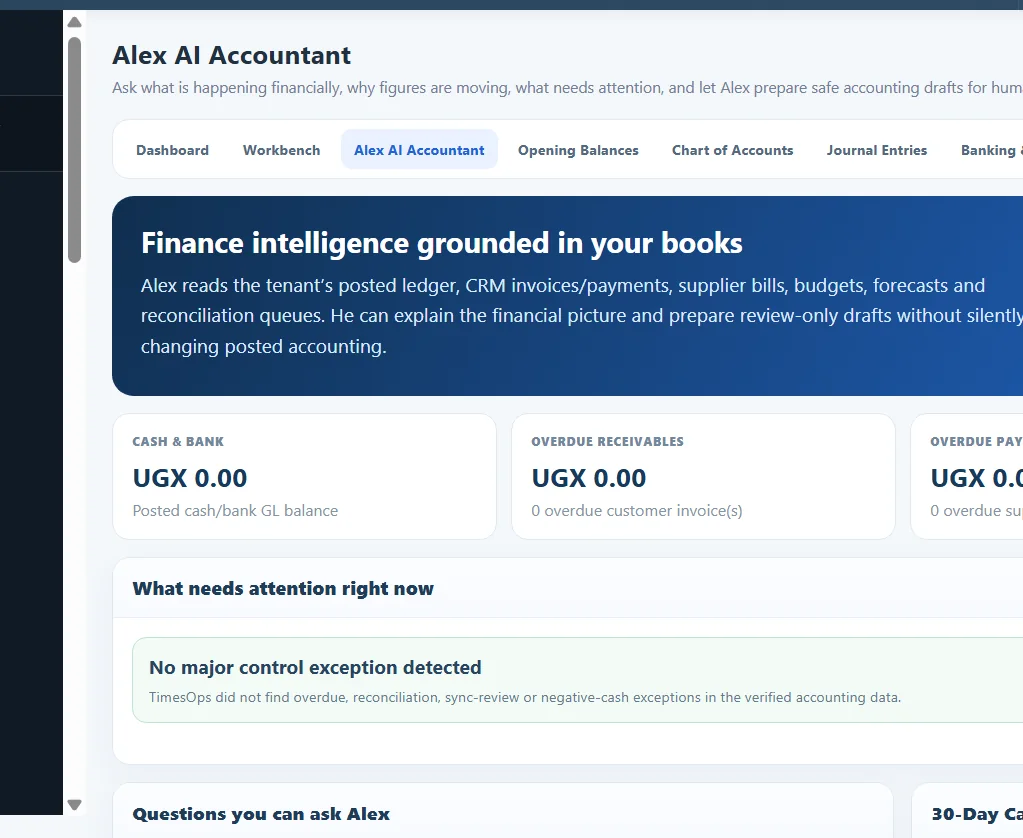
Explore the actual finance workbench and review-first assistant, shown using zero-balance example data.
See packages and availability Example tenant content is for illustration; external providers require setup.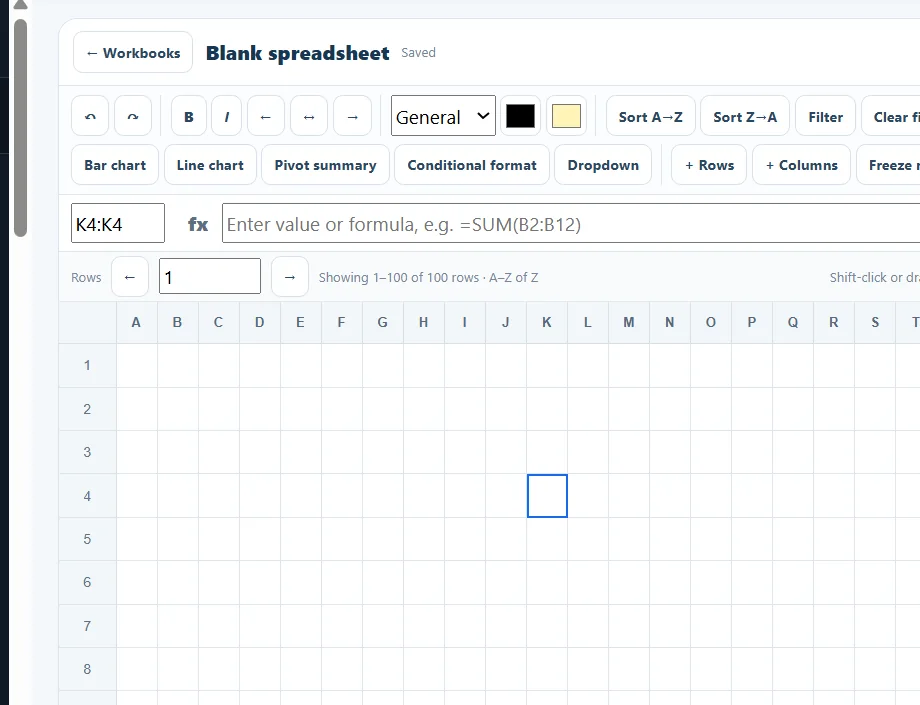
An actual blank TimesOps workbook with editing controls, formula bar and analysis tools.
See packages and availability Example tenant content is for illustration; external providers require setup.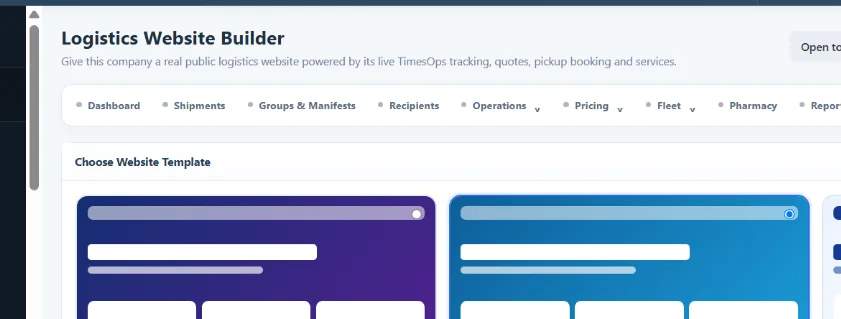
See the actual TimesOps logistics template selection and publishing workspace.
See packages and availability Example tenant content is for illustration; external providers require setup.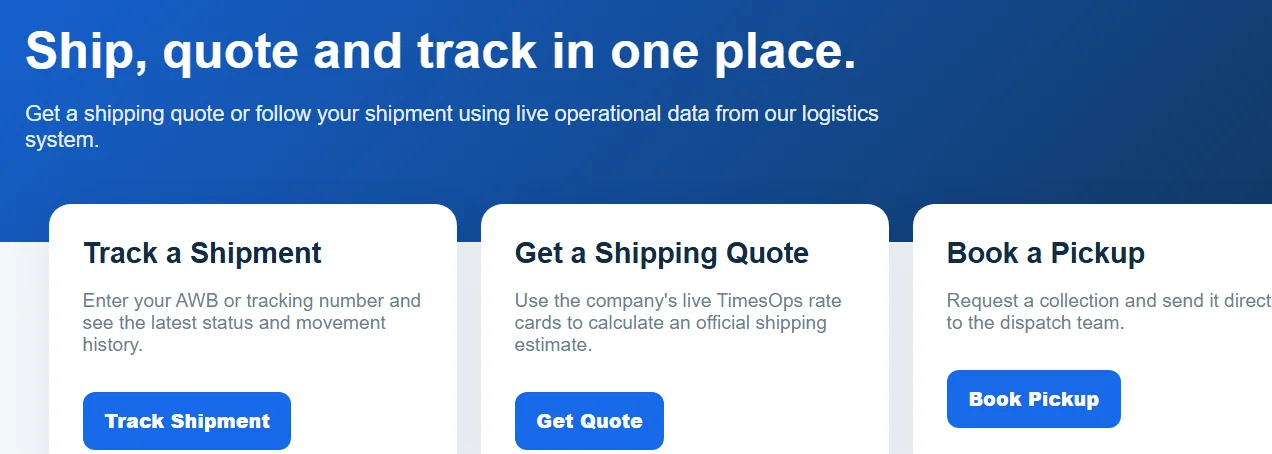
A TimesOps-powered example customer portal for shipment tracking, quotes and pickup requests.
See packages and availability Example tenant content is for illustration; external providers require setup.Alex can help teams prepare responses, surface customer context, identify the next action and assist with enabled modules such as Accounting and Sheets. Sensitive decisions and financial posting remain under human control.
AI access requires an eligible plan, enabled tenant settings and configured credits/provider access.
The customer requested a walkthrough. Create a lead, suggest a demo slot and ask your team to review the reply.
Suggested action · awaiting approvalManage clients, cases, stays, assessments, documents, privacy and reporting in a multi-tenant Housing workspace. Eligible Canadian deployments can add HIFIS-readiness, mapping review and customer-approved governance without enabling direct HIFIS transmission.
Use the modules and integrations that suit your team, subject to published plan allowances and enablement.
Shipments, pickups, tracking, billing and customer portals.
See how it works →Shelter operations, cases, stays, privacy, readiness and mapping governance.
See how it works →Connected enquiries, WooCommerce context and sales follow-up.
See how it works →Appointments, proposals, jobs and team work.
See how it works →Reconciliation, reports, budgets and reviewed finance assistance.
See how it works →People, recruitment, careers, goals and shared work.
See how it works →Capture enquiries, book follow-ups and coordinate customer care.
See how it works →Availability is provider- and tenant-specific. Code support is not a live connection.
Authorized numbers, embedded sites, templates and human takeover.
Account approval / provider fees may applyEligible mailboxes connected to your customer workflow.
OAuth/app and mailbox setup requiredVoice workflows and browser calling where configured.
Provider verification and call charges applyEligible reviewed invoice/payment exports; separate integration module.
Odoo, Sage and Business Central: connection and CSV only · see provider detailsKeep TimesOps CRM documents and your accounting software aligned through supported, reviewed workflows. Each connection belongs to the authorized tenant.
Connection and synchronization are provider-specific. The integration is an optional module, separate from native TimesOps Accounting & Finance.
| Accounting software | Connection | Supported v1.1.0 workflow | Current capability |
|---|---|---|---|
| QuickBooks Online | OAuth 2.0; provider app and company authorization | Eligible customer, tax-free invoice and allocated-payment exports with owner-reviewed mappings.Existing adapter; test with your company and sandbox before live financial writes. | Export adapter · sandbox verification |
| Xero | OAuth 2.0; authorized organisation selection | Eligible contact, tax-free invoice and allocated-payment exports with reviewed mappings.Requires an authorized organisation and verified ledger/account mappings. | Export adapter · sandbox verification |
| Zoho Books | Regional OAuth; authorized organisation selection | Eligible new customer, tax-free invoice and allocated-payment export adapter.Region, currency, zero-tax item and external payment account must be verified. | Export adapter · UAT required |
| Odoo 19 | HTTPS/API-key company connection check (JSON-2) | CSV exports and verified external record-ID mapping.No live financial posting or automatic invoice/payment sync in v1.1.0. | Connection + CSV only |
| Sage Accounting | OAuth business connection (beta) | CSV exports and verified external record-ID mapping.Sage Accounting/Business Cloud; not Sage Intacct. No live financial posting. | Beta · connection + CSV only |
| Dynamics 365 Business Central | Microsoft Entra app connection check | CSV exports and verified external record-ID mapping.Business Central only, not Dynamics 365 Finance. No live financial posting. | Connection + CSV only |
Important: QuickBooks, Xero and Zoho Books have export adapters for eligible records, subject to authentication, verified account mappings, human review and sandbox/UAT. Odoo 19, Sage Accounting and Business Central support connection checks, CSV exports and verified record mapping only—not live financial posting. Installing the module or selecting a plan does not connect an account or enable auto-sync. Provider charges and account approvals may apply.
Discuss accounting integration →No automatic paid activation. Start with a published plan, connect what you need and invite your team.
Select an available published plan. Its price, limits and trial duration come from the owner configuration.
Your selected plan carries through signup; available modules follow plan entitlements and company activation.
Configure authorized channels, assign staff and keep AI and payments under appropriate controls.
The prices and module entitlements shown below are read from Owner → Plans. We don't activate paid subscriptions before payment verification.
Entry plan for a small team using Alex, Website Chat, WhatsApp and WooCommerce. Pricing is owner-configurable.
In this plan
Multi-channel plan with social messaging, AI Call Center, larger teams and higher usage limits. Pricing is owner-configurable.
In this plan
Custom/unlimited plan for larger tenants. Commercial terms are managed by the TimesOps platform owner.
In this plan
For small shelters and housing providers that need core client, case, stay, facility, bed, assessment, document, privacy and operational Housing Support workflows. Advanced Canada/HIFIS readiness and mapping governance are available in Housing Professional.
In this plan
Recommended for established shelters and housing providers. Includes Canada/HIFIS readiness, structured Canadian intake, mapping review, mapping-pack customer approval, versioning, guarded rollback, production onboarding and advanced Housing compliance reporting. Readiness is a technical control and does not represent HIFIS certification.
In this plan
For large providers, multi-site deployments, communities and enterprise Housing operations. Includes the complete current Housing governance suite plus multi-organisation Housing and unlimited staff capacity. Implementation, migration, custom integrations and enterprise support can be commercially scoped separately. Direct HIFIS transmission is not enabled.
In this plan
Prices, monthly AI credit allowances and entitlements come from published Owner → Plans records. Annual billing does not create an annual lump sum of AI credits. * Unlimited refers only to the plan's credit allowance, not unlimited tokens, requests, provider spending or availability. No automatic checkout or credit top-up is implied. Modules need tenant activation; WhatsApp/SMS, telephony and other providers may charge separately.
Trial days are set independently for each published plan. You'll see the exact duration on its card before creating a workspace; packages without a trial offer a demo instead.
Only after your plan includes the feature and your company has activated and connected the required provider account. External charges and approval rules apply.
AI assistance operates under tenant permissions, limits and review controls. Teams must approve sensitive actions and financial posting.
Subscription billing is confirmed by the TimesOps team. Trial signup does not charge your card or automatically activate a paid plan.
Start an available trial or book a guided product demo.